Download 3D Scanner Tool – 3D Scanning App, 3D Scanner for iPhone, iPad, Mac, AR View, Photogrammetry, LiDar Scanner
Overview
3D Scanner Tool is a desktop and mobile application developed by SUN TEAME PTE. LTD., designed to empower users with the ability to create high-quality 3D scans using the built-in cameras of their iPhone, iPad, or Mac. The software falls under the Graphic & Design category and is available at no cost, making it accessible to a broad audience. Its primary purpose is to simplify the 3D scanning process, enabling users to capture real-world objects and convert them into digital 3D models. This capability is particularly useful for professionals in 3D design, game development, virtual tour creation, and augmented reality (AR) content production.
The application supports four distinct scanning methods: Point Cloud Scanner, TrueDepth Scanner, LiDar Scanner, and Photogrammetry. Each method leverages the hardware capabilities of compatible devices, allowing for varying levels of detail and accuracy. The developer has included video tutorials for each scanner type, helping users understand the best practices for capturing high-fidelity scans.
These tutorials enhance usability, especially for beginners. Real-world applications include digitizing physical prototypes, creating assets for AR experiences, and preserving historical artifacts. The app also supports importing and managing 3D files, enabling users to work with existing models alongside newly created scans.
Key Features & Capabilities
- Four 3D Scanning Methods: Users can choose between Point Cloud Scanner, TrueDepth Scanner, LiDar Scanner, and Photogrammetry, each tailored to different device capabilities and use cases.
- Integrated Video Tutorials: Each scanner type includes a dedicated tutorial, guiding users through setup, positioning, and scanning techniques for optimal results.
- Multi-Format Export Support: Scanned models can be exported in OBJ, PLY, STL, SCN, and USDZ formats, ensuring compatibility with various 3D modeling and AR platforms.
- AR View Integration: Users can view and interact with scanned or imported 3D objects in augmented reality directly within the app, enhancing visualization and presentation.
- 3D File Management: The app allows users to import, store, and organize 3D models internally, streamlining workflow for designers and developers.
- Device-Specific Optimization: The software dynamically adapts to available hardware, using TrueDepth or LiDar sensors when available, or defaulting to Photogrammetry on standard cameras.
These features collectively make 3D Scanner Tool a versatile tool for creating and managing 3D assets. For instance, a game developer can use the LiDar Scanner on an iPad Pro to capture a character prop, then export it as a USDZ file for use in an AR game. Similarly, a museum curator might use Photogrammetry on an iPhone to digitize a historical artifact, then share it via AR for public viewing. The inclusion of tutorials ensures that users can quickly learn the most effective scanning techniques for their device and project goals.
User Interface, Workflow & Performance
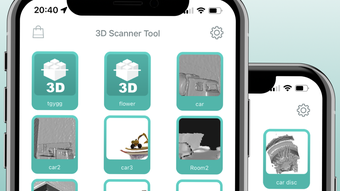
The user interface of 3D Scanner Tool is designed with intuitive navigation, allowing users to access scanning modes, manage files, and view AR outputs with minimal friction. The layout is consistent across iPhone, iPad, and Mac, ensuring a familiar experience regardless of device. Main functions are accessible through clearly labeled icons and menus, reducing the learning curve for new users. The workflow begins with selecting a scanning method, followed by following the on-screen instructions and tutorial guidance, then capturing the object and reviewing the result.
Performance is expected to vary based on device hardware, particularly for resource-intensive tasks like photogrammetry and LiDar processing. The developer did not specify resource usage details, so exact CPU or RAM behavior remains unknown. However, the app is optimized to leverage device-specific sensors, suggesting efficient processing where supported.
Stability appears to be a priority, as the software is designed to handle complex 3D data streams in real time. Users can expect smooth transitions between scanning, reviewing, and exporting stages. The app’s ability to render 3D models in AR suggests optimized rendering performance, though actual frame rates or load times were not provided.
Compatibility & System Requirements
3D Scanner Tool is compatible with iPhone, iPad, and Mac devices. The software requires specific hardware for full functionality: the TrueDepth camera is necessary for the TrueDepth Scanner, which is available on iPhone X and later models, as well as iPad Pro models. The LiDar Scanner requires devices equipped with a LiDar sensor, such as the iPad Pro or iPhone 12 and later. Photogrammetry is the only method that can be used on devices without specialized cameras, making it the most universally accessible option.
The app’s installation size and exact system requirements were not specified. The developer did not provide detailed information about minimum processor speed, RAM, or storage needs. Users are advised to ensure their device meets the hardware prerequisites for the desired scanning method.
Compatibility with macOS and iOS versions is not explicitly stated. For users relying on older devices, it is recommended to check device specifications before downloading. The developer has not disclosed whether the software supports non-Apple platforms.
Pros and Cons
Pros
- Supports four advanced 3D scanning methods, including LiDar and TrueDepth.
- Includes video tutorials for each scanner type, improving usability.
- Offers AR view for immersive interaction with 3D models.
- Exports to multiple formats, ensuring broad compatibility.
- Free to download and use, with no cost barrier for entry.
- Allows importing and managing 3D files within the app.
Cons
- TrueDepth and LiDar features require specific, newer Apple devices.
- Photogrammetry may require more user effort and time for high-quality results.
- Exact system requirements and performance data were not disclosed.
- Limited information on offline functionality and cloud integration.
- Compatibility with non-Apple platforms is not confirmed.
FAQ Section
Is 3D Scanner Tool available for Windows or Android?
The developer has not confirmed support for Windows or Android platforms. The software is currently designed for Apple devices including iPhone, iPad, and Mac.
Can I use 3D Scanner Tool without a LiDar sensor?
Yes. While LiDar scanning is supported on compatible devices, the app also includes Photogrammetry, which works on any device with a camera, making it accessible to users without LiDar hardware.
Is the app safe to download and use?
3D Scanner Tool is developed by SUN TEAME PTE. LTD. and distributed through official channels. Users should download from trusted sources to ensure security. The developer provides a privacy policy and terms of service for transparency.
How often does the app receive updates?
The app was released on June 1, 2024. Update frequency has not been specified by the developer. Users are encouraged to check for updates through their device’s app store.
Does 3D Scanner Tool require an internet connection?
The app can function offline for scanning and viewing 3D models. However, certain features such as tutorials or updates may require an internet connection. The developer did not specify full offline capabilities.
Final Thoughts
3D Scanner Tool stands out as a powerful, free solution for creating 3D content on Apple devices. Its combination of multiple scanning technologies, AR integration, and export flexibility makes it a valuable tool for 3D designers, game developers, and AR creators. The inclusion of tutorial videos enhances accessibility, while the support for various file formats ensures compatibility across platforms. Although hardware limitations restrict full functionality to newer Apple devices, the app remains highly accessible through its Photogrammetry option.
For users with compatible hardware, 3D Scanner Tool offers a streamlined, professional-grade scanning experience without cost. It is particularly well-suited for creative professionals and hobbyists seeking to digitize physical objects or build AR assets. The lack of detailed system requirements and performance data is a minor drawback, but does not diminish the app’s overall utility.
Download 3D Scanner Tool now to start creating immersive 3D experiences on your Apple device.


